Skip to content
KopiaLens 1.0 is out

A backup app you can see inside.

Back up to any drive, NAS or cloud. Then see every folder's real size, find any file in any version, and clear junk out of old backups.

  • Free backup app
  • Works alongside KopiaUI
  • Windows, macOS, Linux and NAS
  • Built by a Kopia user
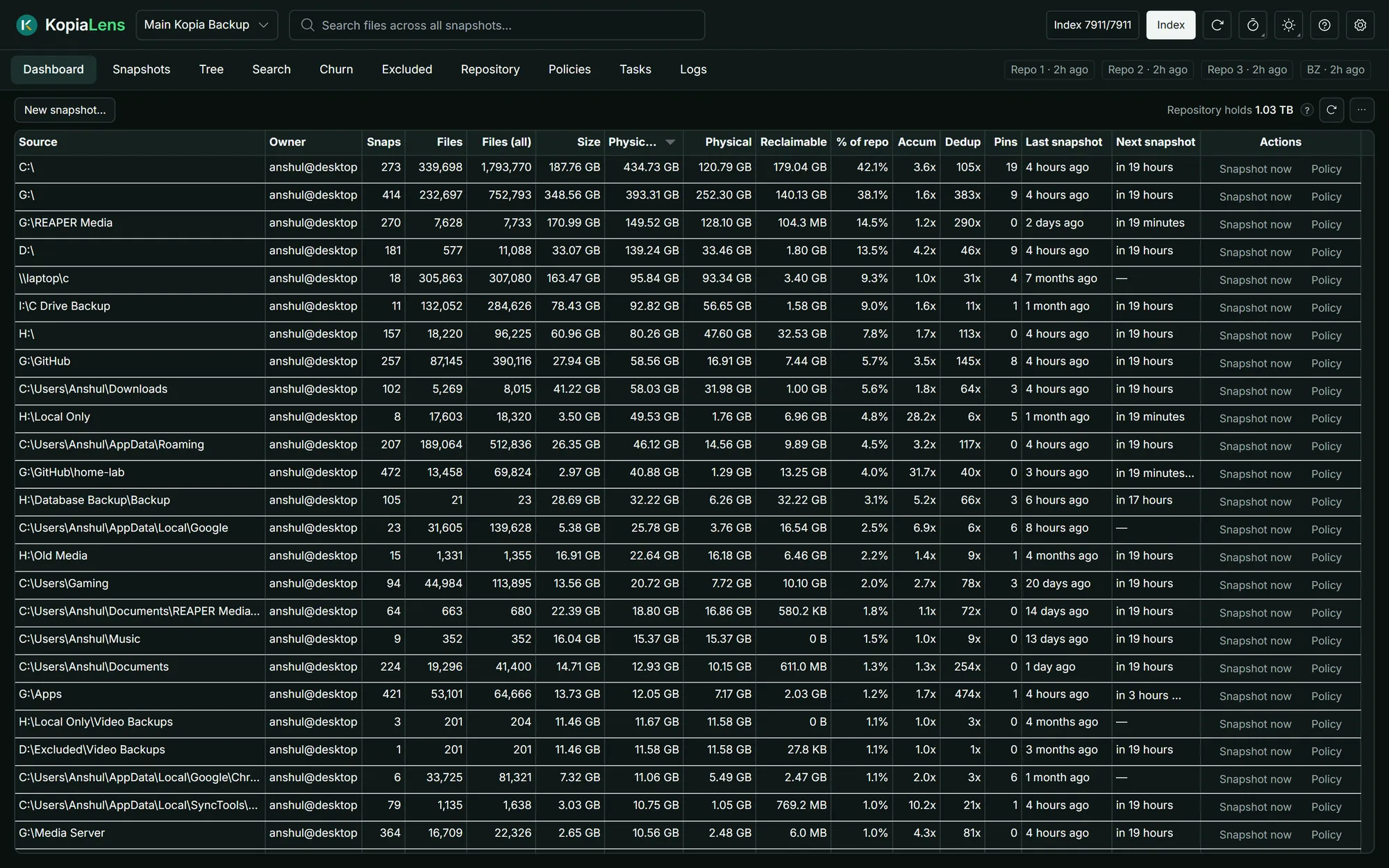
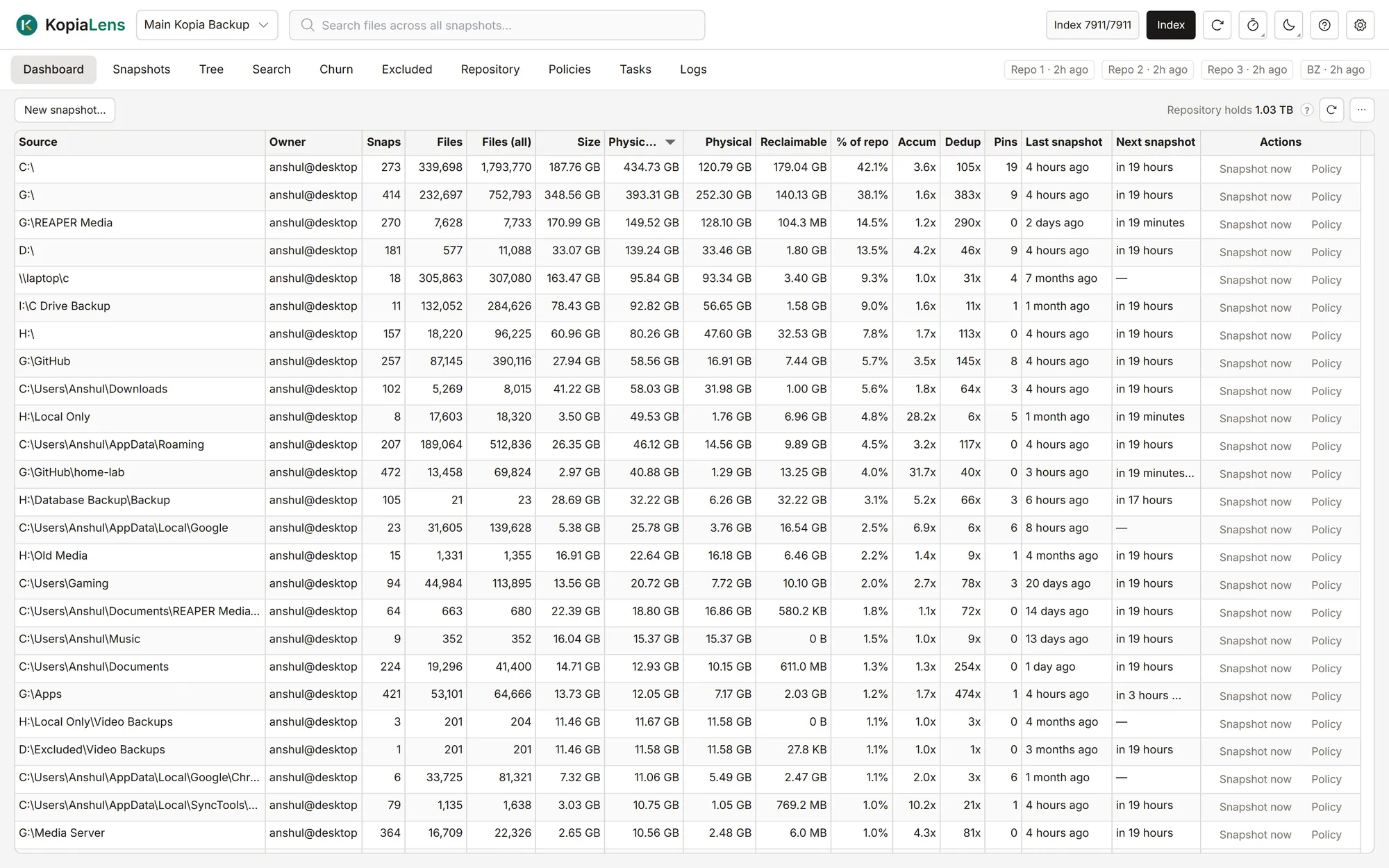
KopiaLens Dashboard listing backed-up folders with physical size, freeable space and dedup ratioKopiaLens Dashboard listing backed-up folders with physical size, freeable space and dedup ratio

See where the space goes. Every folder you back up, with the space it really takes after deduplication and how much you'd get back by deleting its snapshots.

of junk removed from my own backups
400+ GB
of junk removed from my own backups
file versions searched in about a second
19 million
file versions searched in about a second
of real repositories I tested on
5 TB
of real repositories I tested on

How it works

Back up. Look inside. Clean up.

  1. 1

    Back up

    Back up to a drive, NAS or the cloud on a schedule, encrypted and deduplicated by Kopia.

    • Backups on a scheduleFree
    • Restore any file or folderFree
    • Check backups can be readFree
    • Alerts when a backup failsFree
  2. 2

    Look inside

    See what every folder really costs, every version of every file, and what grows each night.

    • Real sizes after deduplicationFree
    • Search every snapshot at onceFree
    • Find what grows every nightFree
    • See what isn't backed upFree
  3. 3

    Clean up

    Remove junk from every old backup that holds it, and keep the rest of your history.

    • Delete the snapshots you pickFree
    • Remove files from old backupsPro
    • Keep fewer versions of a filePro
    • Exclude and delete in one goPro

See inside

Every view your backups were missing

Browse snapshots the way you do in KopiaUI, plus the ways you wish you could.

KopiaLens Dashboard listing backed-up folders with physical size, freeable space and dedup ratioKopiaLens Dashboard listing backed-up folders with physical size, freeable space and dedup ratio

Every folder you back up, with the space it really takes after deduplication and how much you'd get back by deleting its snapshots.

  • The real size of every folder, and its share of the repository
  • File counts and the latest snapshot at a glance
  • Double-click a folder to look inside
More about Dashboard

Also in KopiaLens: Tasks, Repository, Logs, Backblaze. See every feature

Backups

Backups that run on their own.

KopiaLens runs your backups on a schedule, keeps every version, and gets files back when you need them.

Backups on a schedule

Each folder backs up on its own schedule. Failed backups retry, and you can pause or back up by hand.

Restore anything

Find a file by name across every snapshot, including files you've deleted, and restore it next to the original.

Verify backups

Check that every snapshot can be read, and download a share of files to test their contents.

Alerts

Hear about a failed backup in the app, the tray, or on your phone through ntfy or a webhook.

Encrypted and deduplicated

Kopia encrypts everything on your computer before it leaves, compresses it, and stores repeated data once, even across computers.

Almost any storage

A local or network drive, SFTP, S3 and S3-compatible storage, Backblaze B2, Azure, Google Cloud, Google Drive, WebDAV, or anything rclone reaches.

Underneath is Kopia, the open-source backup engine trusted by thousands.

Start backing up from scratch

Clean up

Kopia keeps everything you back up, including the mistakes.

That's what makes it reliable. It also means a cache folder or a 40 GB disk image that slipped in once stays in every snapshot that holds it. KopiaLens finds it and removes it from all of them.

Sizes that don't add up

KopiaUI shows each snapshot's size before deduplication, so it can't tell you which folders really hold the space. KopiaLens shows the real size of every folder.

Small files with huge histories

A 50 MB database that changes every night can take 10 GB in old versions. Churn finds files like it, and Prune keeps only the versions you want.

Cleanup without the command line

Removing a file from existing snapshots used to mean kopia's command line and a guess at what it frees. KopiaLens shows the space first, then does it for you.

Every removal is previewed first

Removing data from a backup should never be a leap of faith.

  1. 01

    Preview

    The files that will go, the snapshots they're in, and the space they free.

  2. 02

    Dry run, if you want

    kopia's own dry run shows its answer before anything changes.

  3. 03

    Confirm

    A confirm dialog that names exactly what goes and what can't be undone.

  4. 04

    Run

    A job with live progress and a log, removing exactly what you previewed.

ProRemoving data from inside snapshots is Pro. Every preview is free, so you see what you'd get back first.See what Pro includes

Read-only until you act

Indexing only reads your repository. Nothing in it changes until you start an action and confirm it.

Your index stays on your machine

File names and sizes stay on your own disk, encrypted by default.

Standard Kopia backups

Your backups stay ordinary Kopia backups. KopiaUI and the kopia command line can always open them.

No account, no lock-in

Activate once, and Pro keeps working even when you're offline.

Already use Kopia?

Your Kopia, your way

KopiaLens opens the repository you already have. Nothing is copied or converted.

Replace KopiaUI

Everything KopiaUI does, in one app, plus the views it doesn't have.

Move from KopiaUI

Run them side by side

Opens the same repository. Nothing to migrate, and KopiaUI keeps working.

KopiaLens alongside KopiaUI

Start fresh

New to Kopia? Create your first backup inside KopiaLens.

Start from scratch

Using BlinkDisk? KopiaLens opens BlinkDisk vaults too. Using KopiaLens with BlinkDisk

AI agents

Let your AI assistant look after your backups

An AI agent in your terminal can use klens, KopiaLens's command line, to answer questions about your backups and prepare cleanups.

A token for each agent

Read-only to look and plan, or full access to act. Revoke one without touching the others.

You approve removals

Anything that removes data waits for your approval in KopiaLens. An agent can't approve its own request.

Every action logged

The audit log lets you verify every action an agent takes.

Ask it things like

  • Which folders take the most space in my backups?
  • Which files changed the most in the last month?
  • Is anything on my D: drive not backed up?
  • What would removing my old downloads folder free?
Use KopiaLens with an AI agent

Platforms

On your desktop or your server

Runs where your backups run.

Windows, macOS and Linux

A desktop app with a tray icon that starts with your computer. Kopia comes bundled.

First-time setup

Servers and NAS

One Docker container with kopia built in, for a home server or NAS. Open it from any browser on your network.

Running in Docker

Home Assistant

Install it as a Home Assistant add-on and keep an eye on your backups next to the rest of your home.

Home Assistant add-on

Any browser

Sign-in, HTTPS and reverse-proxy support let you reach KopiaLens safely from other devices.

Remote access and HTTPS

Pricing

Free to back up. Pro to clean up.

Backups, restore, search and every analysis view are free, with no time limit and no account. Pro removes junk from inside your old backups.

Free

$0forever

The whole backup app. No time limit, no account.

  • Scheduled backups, restore and verify
  • Dashboard, Tree, Search, Churn and Simulate
  • Every preview: see what any cleanup would free
  • Delete snapshots, run maintenance, edit policies
  • Docker, Home Assistant and AI agents
Download free

Pro, yearly

Launch price

$20Regular price $30per year

Locked in for every renewal

Get your space back from inside old backups, for a year.

  • Everything in Free
  • Remove files and folders from existing snapshots
  • Prune versions: keep the ones you choose
  • Smart exclude rules, and exclude & delete
  • Updates for the year
Buy Pro, yearly

Pro, lifetime

Launch price

$50Regular price $80one time

Pay once and keep Pro.

  • Everything in Pro
  • Yours to keep, with no renewal
  • Every update up to version 2.x
Buy Pro, lifetime

Business

Launch price

$99Regular price $150per year

Locked in for every renewal

For companies using Pro on work data.

  • Everything in Pro
  • Up to 10 installs
  • Licensed to your organisation
Buy Business

Supporting on Patreon? Every paid Patreon tier includes Pro for as long as you're a member. Sign in with Patreon in KopiaLens to turn it on. See the Patreon page

On paid cloud storage, Pro can pay for itself. Work out what your junk costs

Compare

What KopiaLens adds to Kopia

KopiaLens can replace KopiaUI, run alongside it, or be your first Kopia app. Here's what each one does.

  • Run backups on a schedule

    KopiaLens
    KopiaUI
    kopia CLI
    With a kopia server
  • Browse, restore and mount snapshots

    KopiaLens
    KopiaUI
    kopia CLI
  • Edit policies, retention and exclusions

    KopiaLens
    KopiaUI
    kopia CLI
  • Physical size of each folder after deduplication

    KopiaLens
    KopiaUI
    kopia CLI
  • Space freed by deleting a snapshot

    KopiaLens
    KopiaUI
    kopia CLI
  • Search files across every snapshot and repository

    KopiaLens
    KopiaUI
    kopia CLI
  • Churn: what changes every night

    KopiaLens
    KopiaUI
    kopia CLI
  • Simulate a retention policy

    KopiaLens
    KopiaUI
    kopia CLI
    Current policy only
  • Delete snapshots

    KopiaLens
    KopiaUI
    kopia CLI
  • Remove files from existing snapshots

    KopiaLens
    PROYes, with Pro
    KopiaUI
    kopia CLI
    Manual
  • Preview the space a removal frees

    KopiaLens
    KopiaUI
    kopia CLI
  • Price

    KopiaLens
    Free, Pro from $20
    KopiaUI
    Free
    kopia CLI
    Free
All comparisons

Why KopiaLens exists

I built KopiaLens because I needed a way to find out why my backups were taking so much more space than they should have. With this tool, I've been able to reclaim 400+ GB across 5 TB of Kopia repos, just by deleting useless junk that kept backing up. I hope it helps other users do the same, and more.

Anshul

Creator of KopiaLens

FAQ

Questions, answered

Is it safe to run on my real backups?

Indexing only reads your repository. Nothing in it changes until you start an action and confirm it. Every removal shows the files it will remove and the space it frees, lets you run kopia's dry run first, and then removes exactly what you previewed. Every action is logged, so you can always trace what changed and when.

Do I have to replace KopiaUI?

No, it's up to you. KopiaLens does everything KopiaUI does, so it can replace it. It can also run next to KopiaUI on the same repository, with nothing to migrate. And if you've never used Kopia, it's a complete backup app on its own.

KopiaLens alongside KopiaUI
Do I need to know Kopia to use it?

No. First-time setup creates a repository (the storage where your backups live) on a drive, NAS or cloud storage, and then you pick the folders to back up and when. The glossary explains any Kopia word you come across.

New to backups? Start here
What does Pro add?

Pro clears junk out of your old backups. It removes files and folders from existing snapshots, prunes versions you don't need, and adds rules that exclude similar files in one go. Everything else is free: backups, restore, search, every analysis view, and the preview of what a Pro action would free.

Compare Free and Pro
Where are my backups stored?

Wherever you choose. Kopia keeps your backups in a repository on a local or network drive, SFTP, Amazon S3 or another S3-compatible service, Backblaze B2, Azure, Google Cloud Storage, Google Drive, WebDAV, or anything rclone reaches. Everything is encrypted on your computer before it's stored.

Already have a repository? KopiaLens runs kopia itself, so it opens the repositories kopia opens.

How big a repository can it handle?

KopiaLens is used every day on two real repositories with very different shapes: a whole-PC backup of about 1 TB with around 20 million file versions and 7,500 snapshots, and a 4 TB media repository of fewer, much larger files. The first index of a big repository takes a while, and KopiaLens shows an estimate as it goes; after that, a nightly pass keeps it current.

Got a much bigger repository, or running into trouble? Email support@kopialens.com and we'll look at it with you.

What happens when Kopia updates?

KopiaLens comes with the kopia version it's tested with, and newer kopia versions arrive in KopiaLens updates once they've been tested. If you'd rather use your own kopia, you can point KopiaLens at it in Settings.

Does KopiaLens send any data?

Once a day it checks for updates and sends a few anonymous usage stats, such as the version and which features were used. Nothing from your backups is ever sent: no paths, file names, sizes or repository addresses. Both can be turned off in Settings, which shows exactly what the next check sends. With Pro, KopiaLens also checks your licence once a week when you're online.

What the update check sends
Which platforms does it run on?

Windows, macOS and Linux as a desktop app, Docker for home servers and NAS boxes, and Home Assistant as an add-on. Wherever it runs, you can open it from any browser on your network.

Is there a free trial of Pro?

The free version has no time limit, and every preview is free, so you can see what a Pro action would free before you buy. The demo data built into KopiaLens unlocks every Pro action to try.

What happens if KopiaLens stops being developed?

Your backups are standard Kopia backups, so KopiaUI and the kopia command line can always open, restore and keep running them, with or without KopiaLens. Pro also works offline, so the copy you have keeps working. And if I ever stop developing KopiaLens, I'll publish its full source code so the community can keep it going.

Something else? Read the docs or email support@kopialens.com.

Put your backups under the lens

Download KopiaLens free. It opens the Kopia backups you already have, or starts new ones.

Get the KopiaLens newsletter

KopiaLens news, updates and backup guides. Unsubscribe any time.

KopiaLens is built by one independent developer. Back its development on Patreon, GitHub Sponsors, Ko-fi or PayPal.

Support KopiaLens