Policy editor
The policy editor holds every kopia policy setting, in six sections on the Policies tab: Exclusions, Retention, Schedule, Files, Compression and Advanced. This page describes each setting. Changes are staged until you review and save them (Review and save).
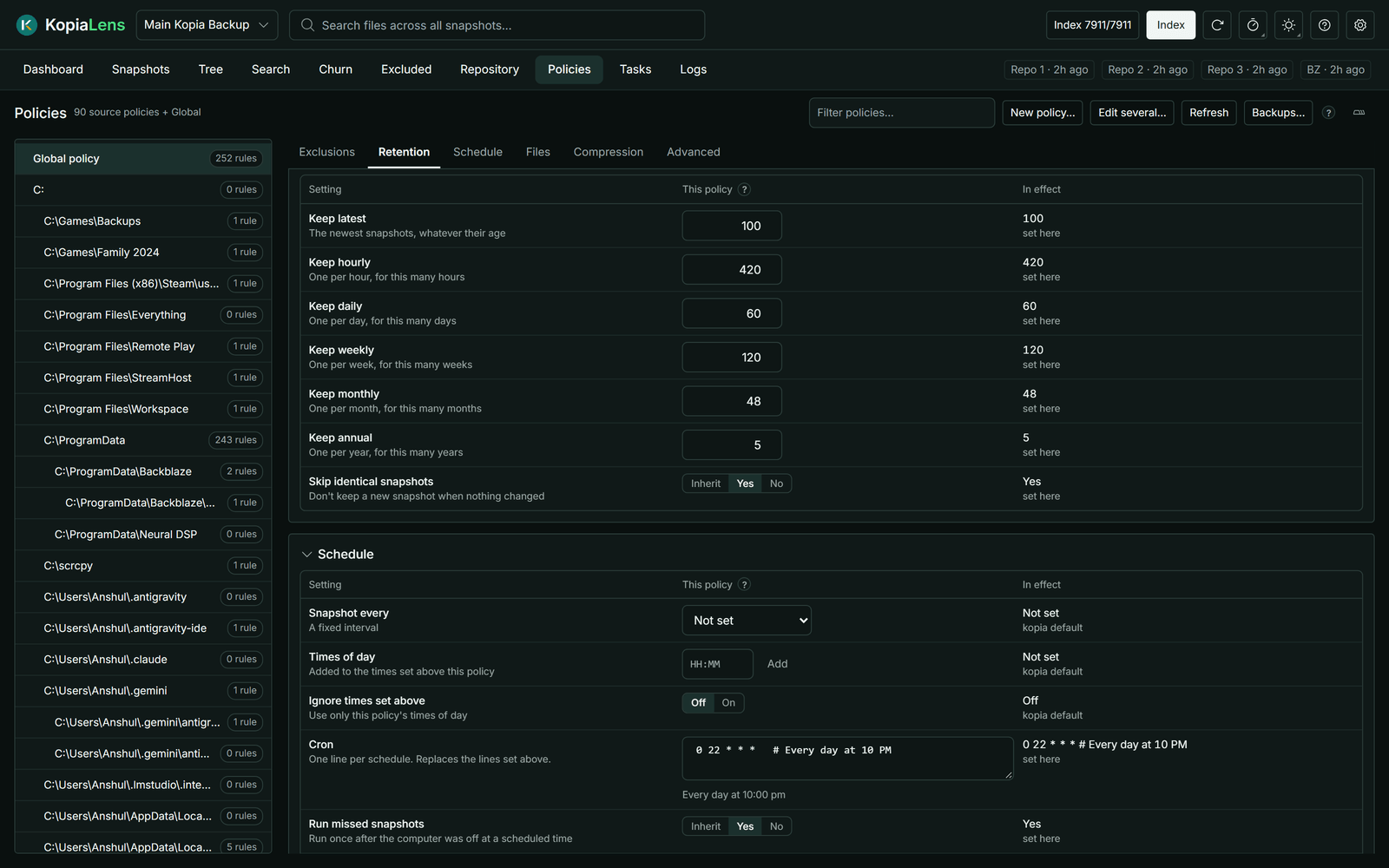
How fields work
- A blank field inherits its value from the policy above (How policies apply).
- Beside each field, the editor shows the value In effect and where it comes from: set here, or from the policy that sets it.
- A changed field is marked, and Undo next to it takes the change back.
- Some fields add to the values set above (marked Added to in the field's help). Their Ignore … set above switch uses only this policy's values.
Policy editor layout in Settings → Appearance shows one section at a time (Tabs) or every section stacked (Scroll).
Exclusions
The rules that keep files out of snapshots. See Exclusions.
Retention
How many snapshots kopia keeps. Kopia keeps a snapshot when any rule keeps it.
| Setting | What it keeps |
|---|---|
| Keep latest | The newest snapshots, whatever their age |
| Keep hourly | One per hour, for this many hours |
| Keep daily | One per day, for this many days |
| Keep weekly | One per week, for this many weeks |
| Keep monthly | One per month, for this many months |
| Keep annual | One per year, for this many years |
| Skip identical snapshots | Don't keep a new snapshot when nothing changed |
What the new retention keeps counts, for each source, how many snapshots the changed rules keep and how many they drop. Kopia deletes the dropped ones the next time it takes a snapshot of that source. Pinned snapshots are always kept. Simulate shows the space this frees.
Schedule
When kopia takes snapshots. Only the app that runs the repository's backups follows the schedule (Who runs backups).
| Setting | What it does |
|---|---|
| Snapshot every | A fixed interval, from 10 minutes to 2 days |
| Times of day | Set times, for example 09 and 21. Added to the times set above this policy |
| Ignore times set above | Use only this policy's times of day |
| Cron | One line per schedule, in cron format. Replaces the lines set above. The editor shows what each line means |
| Run missed snapshots | Take one snapshot after the computer was off at a scheduled time |
| Manual only | Never back up on a schedule. Can't be combined with the other schedule settings |
Next snapshots lists the next times the schedule gives.
Two kopia rules to know about cron lines: kopia reads # as the start of a comment, so 0 12 * * FRI#2 runs every Friday. And kopia works intervals out on UTC time, so an hourly schedule can land at half past the hour in some time zones.
Files
| Setting | What it does |
|---|---|
| Rule files | File names that hold extra exclusion rules, such as .kopiaignore |
| Ignore rule files set above | Use only this policy's rule files |
| Skip cache folders | Leave out folders marked with a CACHEDIR.TAG file |
| Skip files larger than | Leave out files bigger than this |
| Stay on one drive | Don't follow into other drives mounted inside the folder |
Compression
| Setting | What it does |
|---|---|
| Compression | How file data is compressed, for example zstd |
| Metadata compression | How folder listings and other metadata are compressed |
| Only compress | Extensions to compress. Added to the list set above |
| Never compress | Extensions to store as they are. Added to the list set above |
| Smallest file to compress, Largest file to compress | Files outside these sizes are stored as they are |
Compression changes apply to data uploaded from now on. Data already stored isn't compressed again.
Advanced
Error handling
Ignore file read errors, Ignore folder read errors and Ignore unknown file types (sockets, devices and similar). When on, a file or folder that can't be read doesn't fail the snapshot.
Upload
| Setting | What it does |
|---|---|
| Snapshots at the same time | How many snapshots run at once. Only the Global policy or a user or computer policy can set it |
| Files read at the same time | Blank means automatic |
| Upload in parts above | Files bigger than this upload in parallel parts |
Snapshot scripts
Commands kopia runs around a snapshot: Before snapshot and After snapshot for the whole snapshot, and Before this folder and After this folder, which apply only to this policy and are never inherited. Each takes a program or script path, arguments and a timeout in seconds. Choose Must succeed (the snapshot fails if the script fails), Optional, or Run in background.
Kopia runs scripts only on a computer whose connection allows it. When it's off, the section says so and offers Turn on scripts (Snapshot scripts).
Windows shadow copy
Use shadow copy: Never, When available or Always. A shadow copy backs up open or locked files from a frozen copy of the drive. It works on Windows only, and kopia needs administrator rights to make one.
Splitter
Splitter override changes how files are cut into pieces. Changing it makes new data deduplicate badly against data already stored, so leave it unless you know you need it.
Logging
How much kopia writes to its log about Folders backed up, Folders skipped, Files backed up, Files skipped, Files unchanged and Files read again. Each is a detail level from 0 to 10.
Inheritance
Stop applying parent policies: nothing above this policy applies here, kopia's own defaults included. Use it with care: a setting this policy leaves blank is then not set at all, so it doesn't inherit a value from anywhere.
Raw policy shows the policy as kopia stores it.